A Date with a T-Rex is a comedy visual novel I created in Decker for the RETURN OF THE REALLY BAD IF jam over the course of a week. Players spend the day getting to know Rex, a quirky dino with high standards.
The project was my first time working with Decker, a retro-inspired multimedia tool that blends visual scripting, widgets, and lightweight programming.
Core Work
- Implemented branching dialogue and route management
- Created an interactive topiary customization minigame
- Built ending logic supporting 8 unique outcomes
- Learned and scripted gameplay systems in Lil
- Designed and implemented the game's UI and interactions in Decker
Dialogue
One of the core systems in the game is the dialogue system. Decker provides an optional dialogue module that handles text presentation, character portraits, and player choices, which allowed me to focus on writing branching conversations rather than building a dialogue framework from scratch.
To create dialogue, I stored dialogue text inside Field widgets and triggered it through Button widgets attached to character interactions. Alternatively, dialogue could play at card view[], which happens after the card is shown.
on click do
 dd.open[deck]
 dd.say[character_text.value]
 dd.close[]
end
In the example above character_text is the name of the Field widget that contains the relevant dialogue. See the screenshots below for what this looks like set up in Decker.
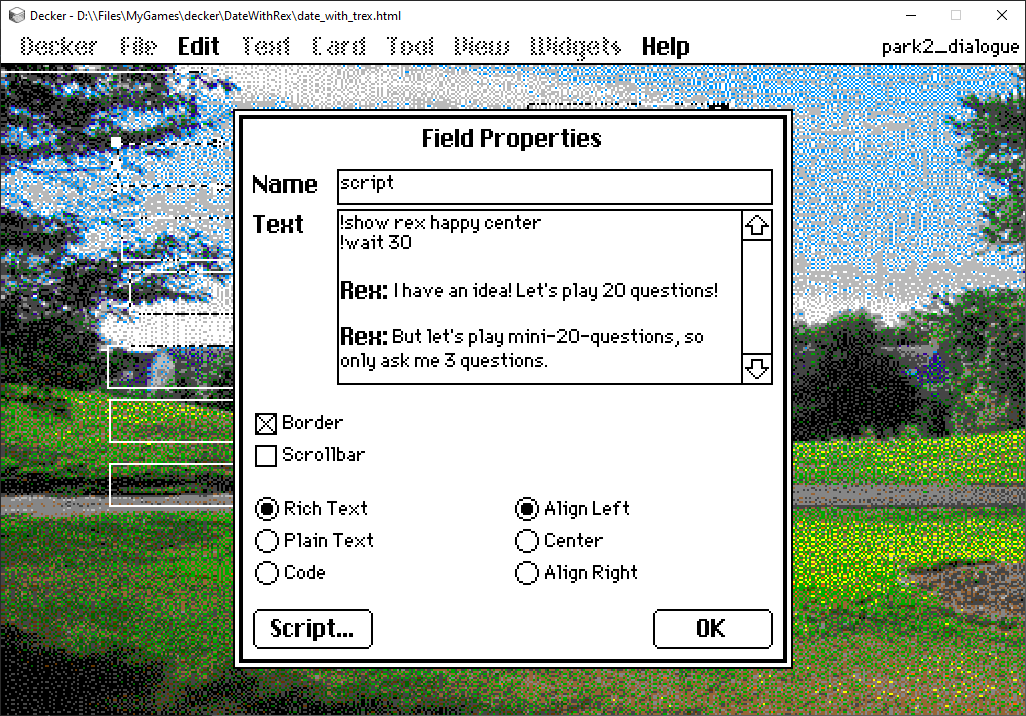
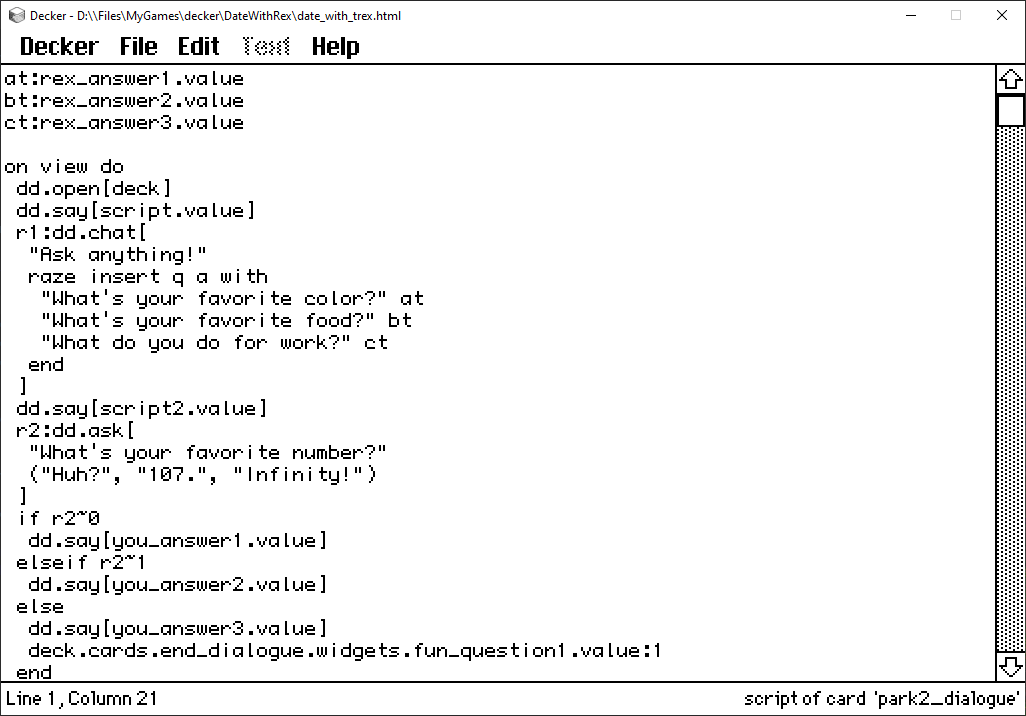
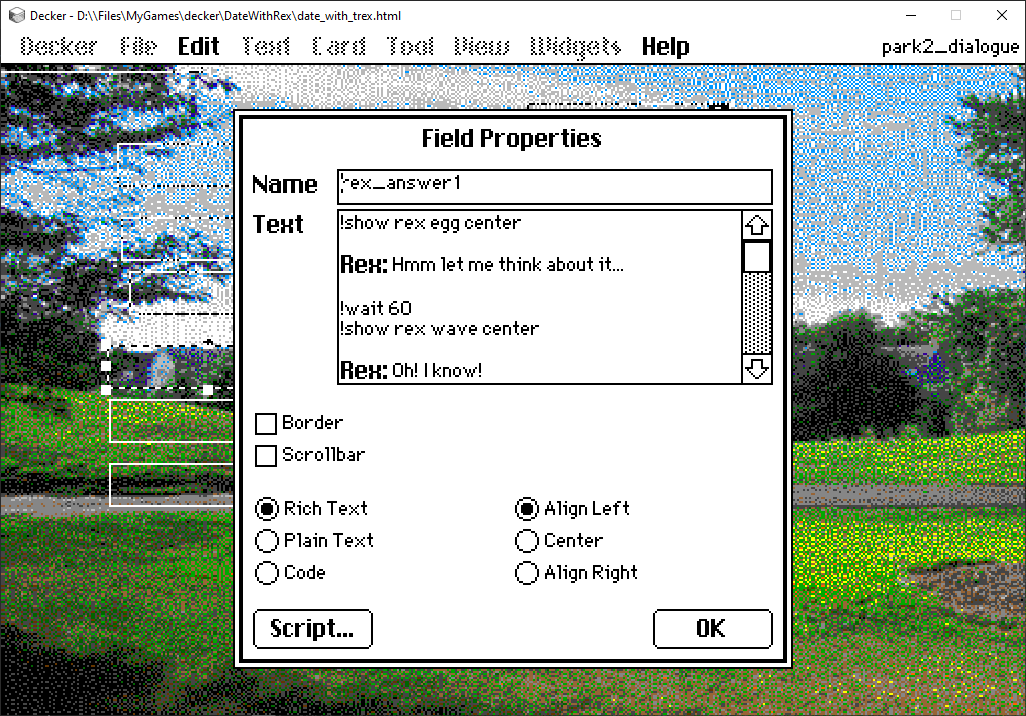
If there is branching dialogue, each character response must be stored in a unique Field widget.
Tracking Routes
I somehow ended up with eight possible endings in this game, depending on the choices made and the route selected. In order to determine what ending the user should receive, I had to find a way to keep track of decisions. Each route and major decision updated one or more of these checkbox values. By the time the player reached the ending, the game could evaluate those stored choices and determine which ending sequence to display.
I discovered the hard way that Decker doesn't allow you to store and modify global variables in scripts. Instead, I had to create a collection of checkboxes in a card, name the checkboxes appropriately, and reference them in other cards' scripts.
end_dialogue.widgets.held_hand.value:0
end_dialogue.widgets.like_nature.value:0
end_dialogue.widgets.swam.value:0
Where end_dialogue is the card name, widgets is a list of all the widgets in that card (i.e. buttons, checkboxes, etc.), and held_hand is the name of a widget. value would simply be 0 for false, and 1 for true in the case of a checkbox.
Topiary Builder?
I have no idea where this idea spawned from, only that it came to me and I had to make it a reality.
I took inspiration from an existing Decker game, Halloweener, where users could customize their own hot dog character. I somehow had the thought to try and apply this functionality to my own game.
The real challenge was learning how to take the code from Halloweener and get it to function slightly differently. Primarily, Halloweener will randomly select one decoration from each type (i.e. if there are 3 possible eye sprites, it will select one for you to use). I wanted to show all possible decorations at once, and not randomize on restock.
no_delete:(bg, build_area, stuff)

on clear_all do
  wids:no_delete drop over_rect[build_area]
  card.remove[wids]
end

on over_rect bin do
 on rover x do rect.overlaps[bin x] end
 bin drop extract value where rover@value from card.widgets
end

on release do
 target:me
 if rect.overlaps[target delete_container]
  if !target.name=delete_container.name
   card.remove[target]
  end
 end
 view[]
end

on restock bin do
 if 0~count no_delete drop over_rect[bin]
  n:"bin_%s" parse bin.name
  c:deck.cards.topiary_stuff
  i:c.copy[c.widgets[n]]
  w:card.paste[i]
  w.pos:bin.pos
 end
end

on view do
 each thing in over_rect[stuff]
  restock[thing]
 end
end
The code above is a slightly modified version of Halloweener's decoration spawn code. There are several invisible canvas widgets in the card that are referenced here in order for this to work.
build_areais the canvas space available for the user to build their topiarystuffis an invisible canvas covering the entire decorations sectioneach thing in over_rect[stuff]gets each widget overlapping withstuff(in this case, the canvases for decorations)releaseruns when the pointer is released- it then checks if anything is overlapping with the delete area, to then delete whatever is there on pointer release
viewruns on first viewing the card, but may also be called by other functions (releasein this case)- it checks for all the
thingsoverlapping withstuffand runs therestockmethod on them
- it checks for all the
restockchecks each invisible decoration canvas ref (i.e.bin_topiaryFlat) overlapping with thestuffcanvas, and if it detects nothing else overlapping, then it spawns the missing decoration- the way this works is that there is a card in the deck named
topiary_stuffnamed similarly to eachthing. The code will find the matching widget and spawn a copy to the topiary builder card
- the way this works is that there is a card in the deck named
Demo Video
Closing Thoughts
A Date with a T-Rex was my first project in Decker and a great introduction to its unique approach to game development. While some of the engine's limitations took time to understand, they also pushed me toward solutions that were often more creative than what I would have built in a traditional game engine.
The project taught me how to work with Decker's card and widget system, manage game state without traditional global variables, and build interactive systems using Lil scripting. More importantly, it showed me how much can be accomplished with a small scope and a willingness to experiment.
Despite being a relatively simple project, it ended up becoming one of my favorite game jam experiences and left me excited to explore Decker further in future projects.